Releasing a Qlik Sense application should be more than copying an app into production and hoping everything required has been covered. Even relatively small changes can affect data, calculations, visualisations or downstream users.
A simple, repeatable deployment checklist helps make sure the important steps happen in the right order. The exact process will vary between organisations, but the following provides a practical starting point for Qlik Sense Cloud teams.
Download PDF Checklist1. Before the deployment Starts
- Define what the deployment is intended to deliver.
- Confirm the changes included in the deployment and exclude unfinished work.
- Link the relevant Jira tickets, requirements or change requests.
- Identify who needs to test, review or approve the deployment.
- Confirm the target environments and expected deployment path.
Give each deployment a clear scope. It is much easier to review and approve a deployment when everyone knows exactly what it is supposed to contain.
2. Review What Changed
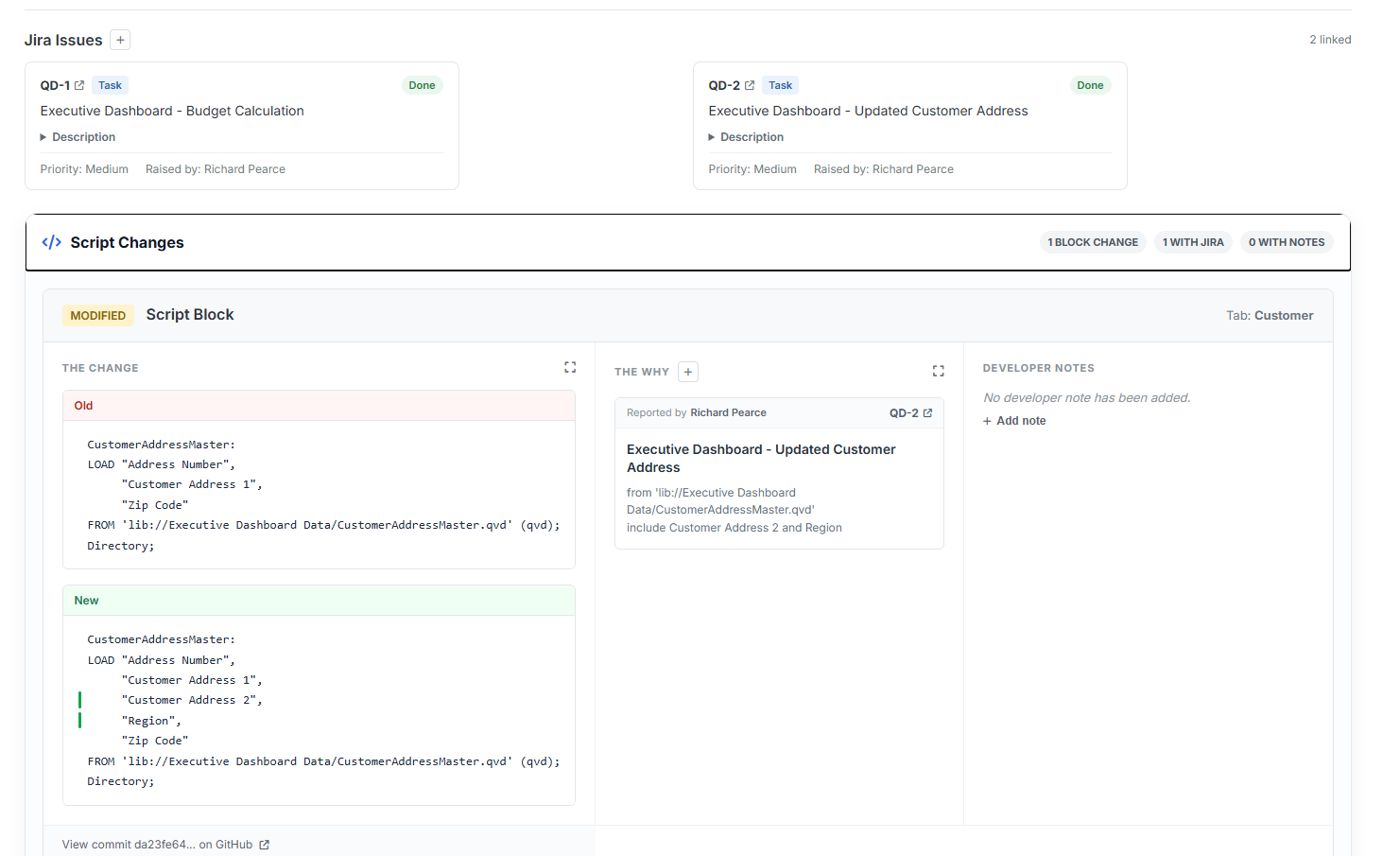
Before formal testing begins, make sure the team can see what has actually changed in the Qlik application.
- Review load-script changes.
- Check new, modified or removed master measures and dimensions.
- Review important variable and expression changes.
- Confirm each significant change has a clear reason or supporting ticket.
- Ask another developer to review higher-risk changes where appropriate.
This is particularly important when several developers have contributed to the application since the previous production deployment.
3. Capture the deployment Version
Create a stable record of the application version that is about to be tested and approved.
- Export the application metadata required for version control.
- Commit the metadata to GitHub using a meaningful deployment reference.
- Record the commit associated with the deployment.
- If material changes are made later, export and commit the metadata again.
The objective is simple: the version being reviewed should be identifiable later without relying on memory or team messages.
4. Test the deployment
- Reload the application successfully in the test environment.
- Check that expected data volumes and refresh behaviour are correct.
- Test the functionality affected by the deployment.
- Validate important measures, filters and selections.
- Check user access and section access where relevant.
- Record defects or questions and resolve them before sign-off.
Testing should concentrate on the areas that changed while still checking that the application behaves correctly as a whole.
5. Get the Required Approval
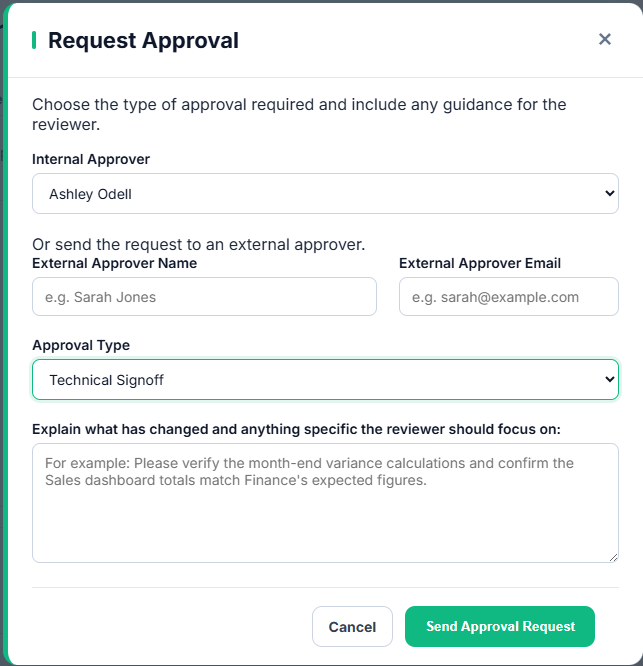
Once testing is complete, collect the sign-offs required by your organisation. These might include business, technical, security or data-owner approval.
- Make sure approvers know what changed and what they are approving.
- Resolve outstanding questions or approval notes.
- Record the approval rather than relying on an informal conversation.
- Confirm no material changes have been introduced since testing and review.
6. Deploy to Production
- Confirm the deployment is approved and ready to deploy.
- Deploy the intended application version to the correct production space.
- Preserve production-specific configuration where required.
- Run or schedule the production reload.
- Check the reload completes successfully.
A production deployment should be the final step in an established deployment process, not the point where the team starts working out what has changed.
7. Complete the Post-deployment Checks
- Open the production application and perform a basic smoke test.
- Confirm key sheets, measures and selections behave as expected.
- Check the latest production data is available.
- Confirm the deployment has been recorded as deployed.
- Retain the deployment history, approvals and version reference for future investigation.
Once these checks are complete, the deployment can be closed with a clear record of what reached production and how it got there.
Managing the Checklist with DevFulfilled
DevFulfilled brings the main parts of the Qlik deployment process into a single workflow rather than leaving teams to manage them across spreadsheets, GitHub, Jira, email and individual Qlik applications.
- Create and track a deployment cycle for each application change.
- Export Qlik metadata and commit the deployment version to GitHub.
- Compare script and application metadata changes between deployments.
- Link Jira tickets and developer notes directly to individual changes.
- Run AI-assisted peer review against committed metadata.
- Request and record formal approvals.
- Track the deployment through testing, approval and deployment.
- Retain the complete history for previous deployments.
The checklist remains the same; DevFulfilled simply makes it easier to see which steps have happened, who was involved and which application version was ultimately deployed.
Frequently Asked Questions
What should be included in a Qlik Sense deployment checklist?
A useful checklist should cover deployment scope, change review, version control, testing, approval, production deployment and post-deployment verification.
Should every Qlik Sense deployment go through the same process?
The level of review may vary according to risk, but using the same basic deployment stages creates consistency and makes it less likely that important steps will be missed.
When should Qlik metadata be committed to GitHub?
Commit the metadata when the deployment reaches a stable review point. If significant changes are made afterwards, create a new export and commit so the version being approved remains clear.
What should be checked after a Qlik Sense deployment?
Confirm the production reload succeeded, key application functionality works, expected data is available and the deployed deployment has been recorded correctly.