Introduction
Most change processes begin with a request. A Jira ticket describes a requirement, a developer changes the Qlik Sense application, testing takes place and somebody eventually approves the release.
The difficulty is that these activities are often stored in different places. Jira contains the request. Qlik contains the application. Git may contain exported metadata. Developer knowledge sits in messages or people's heads. Approval may be recorded somewhere else again.
Months later, a simple question can become surprisingly difficult to answer: why does the application work this way?
Good Qlik Sense change management should connect those pieces. A team should be able to start with an actual application change and see the Jira ticket behind it, the developer's explanation, the release it belonged to and the approval or sign-off that allowed it to reach production.
The Qlik Sense Change Management Problem
A release may contain five or ten Jira tickets, but that does not automatically tell a reviewer which parts of the application were changed for each ticket.
A ticket might say that a margin calculation needs correcting. The release notes might say that the issue was completed. Neither tells the next developer which measure changed, what the previous expression was or whether another script change was made at the same time.
This creates a gap between the reason for a change and the technical change itself.
That gap becomes more important as applications live for years, move between developers and accumulate hundreds of changes. Without a connected history, understanding an older decision can mean searching through Jira, Git, release notes and the current Qlik application and then trying to reconstruct what probably happened.
Release traceability becomes much more useful when it works in both directions. From a Jira ticket you should be able to find the related application changes, and from an application change you should be able to understand the requirement that caused it.
Start With What Actually Changed in Qlik Sense
The foundation of a useful change history is a readable comparison between releases.
Instead of simply recording that the Qlik application changed, the release should identify meaningful changes to application metadata such as load-script sections, master measures, dimensions, variables and other expressions.
For each change, a reviewer should be able to see the previous value and the new value. This turns a release from a collection of tickets into a concrete record of what was altered inside the application.
- Which script logic was added, removed or modified.
- Which master measures changed and how their expressions changed.
- Which dimensions or variables were introduced, updated or removed.
- Which release first introduced the change.
- What the application looked like before and after the change.
This is the technical evidence. The next step is to connect that evidence to the business or delivery reason behind it.
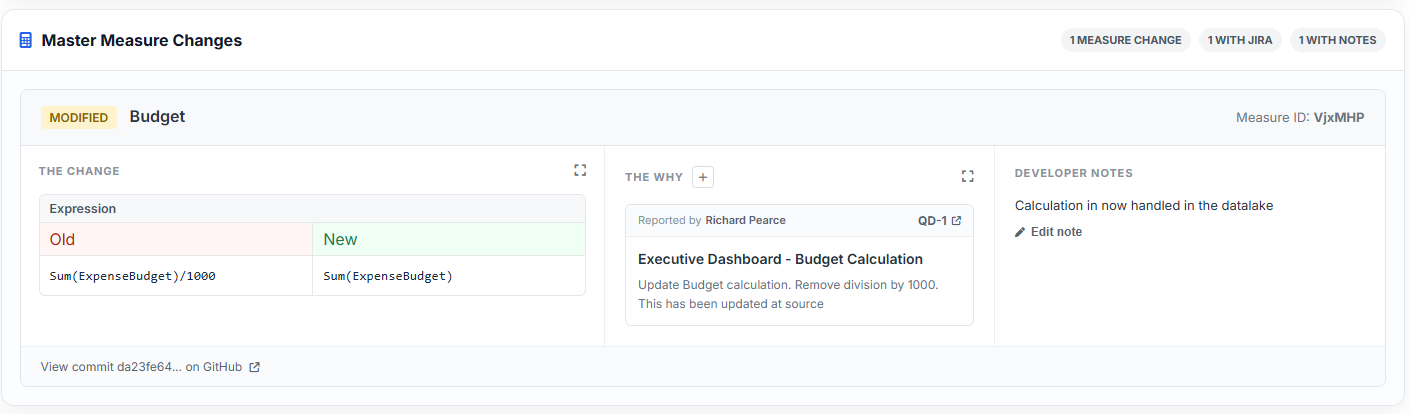
Link Jira Tickets to the Actual Qlik Sense Changes
Linking Jira to a release is useful, but linking Jira to the actual change within the release is considerably more powerful.
A release-level relationship answers: what work was included in this release? A change-level relationship answers: why was this particular piece of the Qlik application changed?
For example, a Jira issue requesting a revised revenue calculation can be linked directly to the master measure or script change that implemented it. If one ticket required several technical changes, the same ticket can be associated with each relevant change. Equally, where a technical change supports more than one requirement, the history can retain those relationships.
This creates a much stronger connection between delivery management and application development:
- Jira ticket: what was requested and why.
- Qlik change: what was technically altered.
- Release: when the change was delivered.
- Approval: who reviewed or signed off the release.
Instead of Jira and Qlik existing as separate records, they become part of the same change story.
Add Developer Notes to Explain the Change
Not every important detail belongs in the Jira ticket. A developer may have made a particular implementation choice, found an unexpected dependency or deliberately avoided a seemingly simpler solution.
A short developer note attached to the individual change preserves that context alongside the technical comparison.
Useful notes might explain why a calculation was rewritten, why a script block had to be moved, why a field name could not be changed or why a temporary compatibility step was required.
The important point is that the note stays with the change. Future developers do not need to find the original developer or search old messages to understand the reasoning.
Developer notes should add context, not duplicate the code or Jira description. A good note explains the decision that would otherwise be difficult to understand six months later.
Understand How a Qlik Application Changes Over Time
The real value of change tracking appears over multiple releases.
A single comparison tells you what changed today. A connected release history can show how a measure, script section or other part of the application evolved over time.
Imagine investigating a master measure that has existed for three years. Rather than opening old applications or searching repository commits, the team should be able to follow its history through the releases in which it changed.
That history can answer questions such as:
- When was this calculation first introduced?
- Which releases subsequently changed it?
- What did the expression look like before each change?
- Which Jira tickets explain those changes?
- What did the developer say about the implementation?
- Which release was approved and ultimately deployed?
This is more useful than a collection of snapshots. It creates an understandable history of the application itself.
Connect Qlik Changes to Approvals and Sign-Off
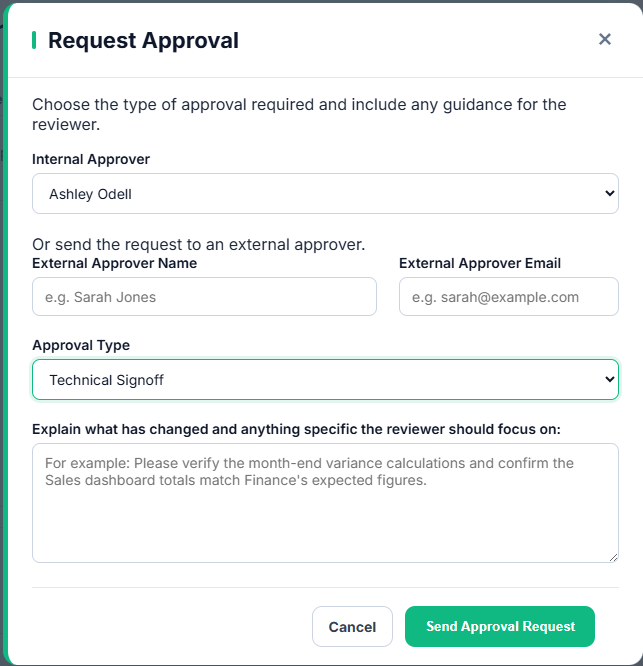
Change visibility is only one part of governance. Teams also need to know whether the release containing those changes was reviewed and accepted.
When application changes, Jira requirements and approvals belong to the same release workflow, sign-off gains much more context. An approver is not simply approving a release name or a list of ticket numbers. The release can show what actually changed and why.
Depending on the organisation, that may include business sign-off, technical sign-off, security review or another approval process.
The resulting chain becomes clear:
Requirement → Jira ticket → Qlik change → developer context → release → approval → deployment.
That relationship is particularly valuable when a release is reviewed later. The team can establish not only that approval happened, but what set of changes and requirements the approval related to.
Build a Clear Qlik Sense Application History
An application history should tell a story that makes sense to somebody who was not involved in the original change.
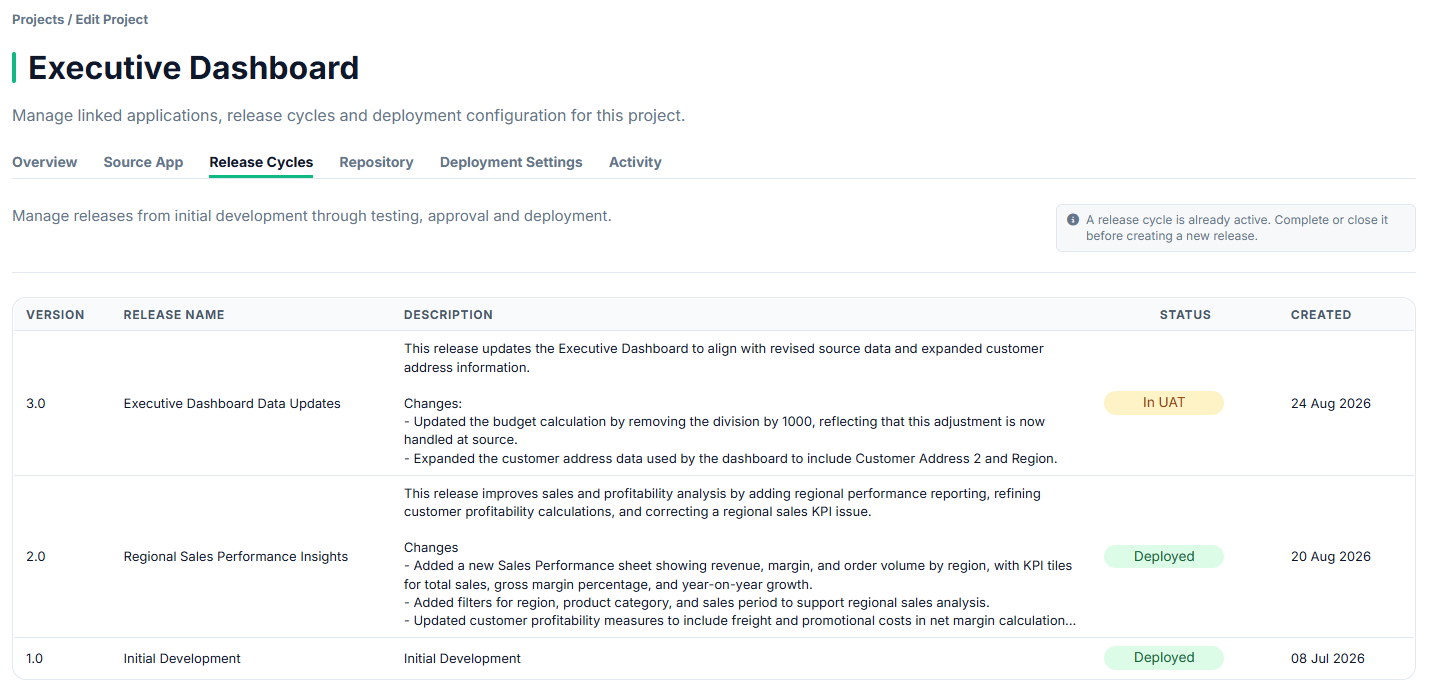
For every release, the team should be able to understand its purpose, the application changes it introduced, the Jira work behind those changes, the developer notes that explain important decisions and the approvals recorded before production.
Over time, those releases become the application's operational history.
This is useful during support, audits, handovers and future development. When somebody asks why a calculation changed last year, the answer is no longer dependent on memory. When a new developer inherits the application, they can see how important logic evolved. When an approver wants evidence of a previous release, the relevant changes and sign-off remain connected.
A clear history also makes future changes safer. Developers can understand the decisions that shaped the current application before altering them again.
From Jira Requirement to Production: End-to-End Traceability
The strongest change-control model does not treat Git, Jira, Qlik Sense and approvals as separate islands.
Each system contributes something different. Jira describes the work. Qlik Sense contains the application. Versioned metadata provides evidence of the technical change. Developer notes preserve implementation context. The release workflow records review, approval and deployment.
Connected together, they provide an end-to-end audit trail:
- The original requirement and Jira issue.
- The exact Qlik Sense changes made to satisfy it.
- The before-and-after technical comparison.
- Developer notes explaining important implementation decisions.
- The release cycle containing the change.
- The approvals, responses and sign-off associated with that release.
- The point at which the approved release reached production.
For governance teams, this provides evidence. For developers, it provides context. For delivery teams, it provides a common view of the change from request through to production.
Qlik Sense Change Management Best Practices
- Compare application metadata between releases so changes are readable.
- Link Jira tickets to individual changes where the relationship is known.
- Keep release-level Jira links as the wider record of work included in the release.
- Use developer notes for implementation context that is not obvious from the change itself.
- Keep notes concise and focused on why a technical decision was made.
- Complete change review before formal approval or sign-off.
- Ensure approvals relate to the release version actually being reviewed.
- Preserve deployed releases rather than replacing their history with the latest state.
- Make previous changes easy to find when the same application logic is modified again.
- Treat application history as part of ongoing development, not simply an audit requirement.
How DevFulfilled Helps
DevFulfilled brings Qlik Sense change comparison, Jira context and release governance into the same workflow.
Application metadata can be captured for a release and compared with the previous version so developers and reviewers can see meaningful changes rather than simply knowing that the application file is different.
Jira issues linked to the release can then be associated with the individual changes they explain. Developer notes can be added alongside those changes to preserve technical context that may not belong in the original ticket.
The same release also retains its wider delivery history, including review activity, approvals and eventual deployment. Previous releases remain available so the application's evolution can be understood over time.
The result is a connected change record rather than a set of disconnected tools:
- Compare Qlik Sense changes between releases.
- See previous and new values for meaningful application changes.
- Link Jira tickets to the actual changes they relate to.
- Add developer notes directly to individual changes.
- Keep Jira requirements, technical changes and release context together.
- Connect the release to formal approvals and sign-off.
- Preserve previous releases as a readable application history.
- Trace a change from its requirement through to production.
The goal is not simply to collect more change data. It is to make the history understandable. A useful record should let somebody move naturally from what changed, to why it changed, to who reviewed it and when it reached production.
Conclusion
Qlik Sense change management becomes much clearer when requirements, technical changes and governance are connected.
A Jira ticket on its own explains the request but not necessarily the implementation. A Git comparison can show technical differences but not why they were made. An approval record confirms sign-off but is far more useful when the approved changes are visible alongside it.
Linking those elements creates a durable application history: what changed, why it changed, how it was implemented, which release delivered it and who approved it.
Over time, that history becomes one of the most valuable parts of the development process. It gives future developers context, gives reviewers evidence and makes every new Qlik Sense change easier to understand in relation to what came before it.
Frequently Asked Questions
Can Jira tickets be linked to individual Qlik Sense changes?
Yes. Linking a Jira issue to the specific script, measure or other application change it relates to provides much stronger traceability than linking the ticket only to the overall release.
Why add developer notes if the Jira ticket already has a description?
The Jira ticket normally describes the requirement. A developer note can preserve implementation context, technical decisions or dependencies that become important when somebody reviews the change later.
How does change history help Qlik Sense developers?
It allows developers to see when application logic changed, what the previous value was, which requirement caused the change and what context was recorded at the time. This reduces reliance on memory and makes future maintenance safer.
Should approvals be linked to Jira tickets or releases?
Formal approval normally applies to a release or defined review point. When Jira tickets and individual changes are already connected to that release, the approval becomes part of a traceable chain from requirement to deployed change.
What should a Qlik Sense application history contain?
A useful history should include previous releases, meaningful application changes, Jira requirements, developer context, versioned metadata, review activity, approvals and deployment information.
Is this only useful for audit and compliance?
No. Auditability is one benefit, but the same history is valuable for everyday development, troubleshooting, application handovers, impact analysis and understanding why existing logic was implemented in a particular way.